CAD/CAM stands for Computer-Aided Design and Computer-Aided Manufacturing.
In dentistry, CAD refers to the digital design of a restoration, while CAM describes its computer-controlled manufacturing. Together, these technologies make it possible to move from patient data to a physical dental restoration within one digital workflow.
A scan provides the digital starting point. The restoration is then designed according to the clinical situation before CAM software calculates the manufacturing strategy. Depending on the indication and material, the final restoration can then be milled from a block or disc.
CAD/CAM is used for both relatively simple single-tooth restorations and complex prosthetic cases. It also forms an important part of the broader field of digital dentistry alongside technologies such as CBCT, 3D printing and digital treatment planning.

Most dental CAD/CAM workflows follow three basic stages:
Scan → Design → Mill
First, the clinical situation is digitized. An intraoral scanner can capture the prepared tooth, adjacent teeth, antagonist and bite directly in the patient's mouth. Dental laboratories can also digitize impressions or physical models using laboratory scanners.
The scan data is then transferred to CAD software. Here, the restoration is designed digitally. Depending on the indication, the user can define margins, tooth morphology, proximal contacts, occlusion and material-specific dimensions.
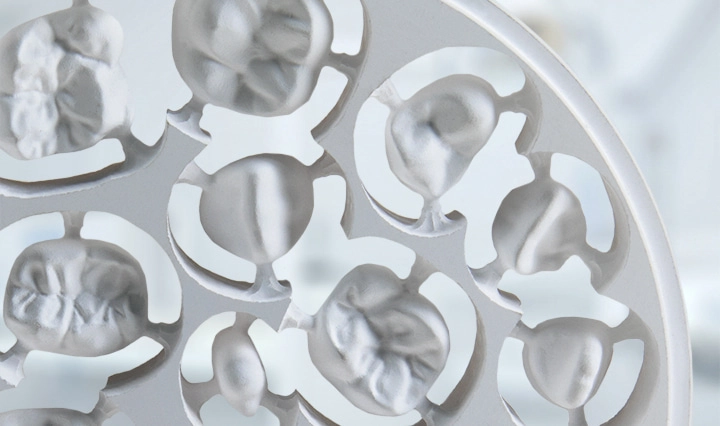
Once the design is complete, the data is transferred to the CAM software. The restoration is positioned within the selected block or disc, and the software calculates toolpaths and machining strategies. The milling machine then produces the restoration.
The final steps depend on the material. Zirconia requires sintering, lithium disilicate usually requires crystallization, while PMMA can generally be finished directly after milling.

The range of CAD/CAM applications has expanded significantly and now covers a large part of modern restorative and prosthetic dentistry.
Typical applications include crowns, bridges, inlays, onlays, veneers, temporary restorations, occlusal splints, implant abutments, bars, dentures and full-arch restorations.
Which restorations can be manufactured depends primarily on the available machine, material and software. Compact chairside systems are often optimized for single-unit restorations and blocks, while larger laboratory systems can process discs, metal materials and complex implant-supported structures.
This means that a suitable CAD/CAM solution should always be selected according to the indications a practice or laboratory actually wants to produce.
CAD/CAM manufacturing can take place directly in the dental practice or in a dental laboratory.
With in-office or chairside CAD/CAM, scanning, design and production remain within the practice. This is particularly useful for suitable single crowns, inlays, onlays and veneers. Depending on the material and finishing requirements, a restoration can potentially be completed in a single patient appointment.
Laboratory CAD/CAM systems are generally designed for a broader range of indications and higher production volumes. Dental laboratories may need to process zirconia, PMMA, PEEK, glass ceramics, titanium and cobalt-chromium while manufacturing everything from single crowns to bars and full-arch restorations.
Both approaches can also be combined. A dental practice may perform the digital scan while a laboratory handles design and manufacturing.
Modern CAD/CAM systems can process a wide variety of dental materials.
Material | Typical applications | Main characteristics |
| Zirconia | Crowns, bridges, full-arch | High strength, good aesthetics |
| Lithium disilicate | Crowns, veneers, inlays, onlays | High translucency, aesthetic |
| PMMA | Temporaries, dentures, splints | Easy and efficient to mill |
| PEEK | Frameworks, selected prosthetics | Lightweight and tough |
| CoCr | Frameworks, bars, telescopic restorations | High strength and rigidity |
| Titanium | Abutments, bars, implant restorations | Strong and biocompatible |
Each material requires a different manufacturing strategy. Zirconia is usually milled in a pre-sintered state and subsequently sintered. Lithium disilicate is commonly processed wet before crystallization, while metals such as titanium and CoCr require more rigid machines and specialized tools.
Material flexibility is therefore an important factor when selecting a CAD/CAM system.

imes-icore focuses primarily on the CAM and manufacturing side of the digital dental workflow.
Patient data can originate from different scanners and restorations can be designed using established dental CAD software. The finished design is then transferred into the CAM environment.
With iCAM, the restoration is prepared for manufacturing. Depending on the configuration, the software handles tasks such as nesting, toolpath calculation and material-specific machining strategies.
The data is then transferred to the appropriate CORiTEC milling system.
Different machine concepts are available for different production environments. Compact systems such as the CORiTEC one address chairside workflows, while laboratory machines such as the CORiTEC 350i and CORiTEC 650i PRO are designed for broader material portfolios and more complex indications.
The workflow can therefore be summarized as:
Digital scan → CAD design → iCAM → CORiTEC milling → Post-processing → Final restoration
Another important aspect is workflow flexibility. Open data formats allow practices and laboratories to combine different scanners, CAD solutions and manufacturing systems instead of being limited to one closed manufacturer ecosystem. This makes it easier to integrate new technology or expand the workflow over time.
The key is the interaction between software, machine, tools and material. Instead of viewing the milling machine as an isolated production step, the individual components work together as part of a connected digital workflow.
CAD/CAM technology connects digital patient data directly with restoration design and manufacturing.
The basic workflow is simple:
Scan → Design → Mill
However, the technology behind these steps allows dental practices and laboratories to manufacture a wide range of restorations from different materials.
Chairside systems can bring selected manufacturing processes directly into the dental practice, while laboratory systems provide the flexibility and capacity required for more complex applications.
For imes-icore, the focus lies on connecting digital design with manufacturing through iCAM software, CORiTEC milling systems and coordinated tools.
CAD/CAM therefore represents more than just a different manufacturing method. It creates a connected digital process that can make dental production more efficient, reproducible and flexible.
FAQ:
What does CAD/CAM stand for?
CAD stands for Computer-Aided Design, while CAM stands for Computer-Aided Manufacturing. In dentistry, CAD is used to design restorations digitally and CAM converts these designs into physical restorations.
Is CAD/CAM better than traditional dentistry?
CAD/CAM can provide advantages such as faster data transfer, reproducible manufacturing and shorter production times. However, conventional techniques remain valuable for selected cases. The best workflow depends on the restoration and clinical requirements.
What restorations can be made with CAD/CAM?
CAD/CAM can be used for crowns, bridges, veneers, inlays, onlays, temporaries, splints, implant abutments, bars and many other prosthetic restorations.
Can CAD/CAM restorations be made directly in the dental practice?
Yes. Chairside systems allow suitable restorations to be scanned, designed and manufactured directly within the dental practice.
What is the difference between open and closed CAD/CAM systems?
Open systems allow components from different manufacturers to exchange data, while closed systems operate within a more restricted manufacturer-specific environment.